Vector Wedding Social Media Pack: A Designer's Toolkit
There's a particular kind of pressure that comes with wedding season for designers and wedding planners alike. The need for elegant, cohesive, and emotionally resonant visuals is constant, yet creating them from scratch for every client or campaign is a recipe for burnout. This is where a thoughtfully curated asset package becomes less of a luxury and more of a necessity. The Vector Wedding Social Media Pack is one such resource, designed to streamline the creative process while delivering a polished, professional aesthetic that speaks directly to the romance and celebration of the occasion.
More Than Just Files: A System for Visual Cohesion
At its core, this package is a system. It's not a random collection of graphics but a unified set of design elements built around a consistent style. You'll find editable EPS 10 vector files, which are the workhorses of the package. Vectors are crucial because they scale infinitely without losing quality, meaning the same floral frame that looks sharp on a website header will print perfectly on a large-format billboard or a delicate invitation. The accompanying high-resolution JPEGs offer a quick, ready-to-use option for digital platforms where quick deployment is key.
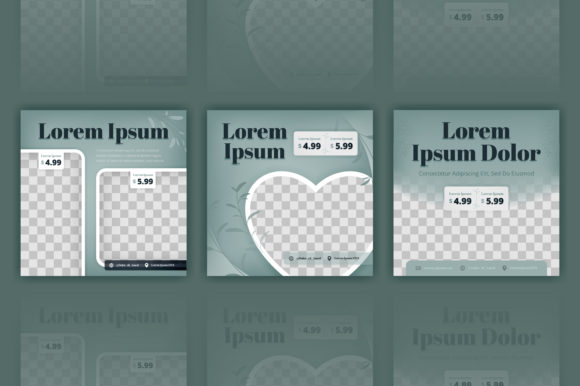
The real value lies in the pre-designed compositions. Think of layouts for Instagram stories, Facebook covers, Pinterest pins, and promotional posts. These aren't just pretty backgrounds; they are structured frameworks with intentional typography placement, balanced negative space, and harmonious color palettes. For a busy wedding planner, this means jumping from a client meeting to scheduling a week's worth of social media content without the daunting blank canvas. For a designer, it provides a robust starting point that can be customized to match a specific brand's color scheme and font pairing in minutes, not hours.
Practical Applications Across the Wedding Industry
Let's break down how this kind of asset integrates into real-world projects. For a branding initiative for a new wedding venue or coordinator, elements from the pack can inform the entire brand identity. The style of the illustrations can guide the logo design, while the color themes set the tone for packaging design—think welcome box graphics or favor tags.
On the digital front, the applications are nearly endless. A wedding blogger can use the frames and layouts to create consistent social media graphics that drive engagement. The same elements ensure a cohesive look between their Instagram feed and their website or blog. For marketing materials, whether it's a Facebook ad for a bridal show or an email newsletter template, having a library of professional, on-theme graphics drastically improves visual consistency and professional presentation.
The offline world is equally covered. The vectors are perfect for print materials like posters, flyers, and editorial layouts in wedding magazines. The designs translate beautifully to merchandise—imagine custom tote bags or bridal party gifts. Of course, the most direct application is for invitations, save-the-dates, and thank you cards, where the elegant typography and ornamental details shine.
Enhancing Communication and Engagement
Why does this matter? Because in the wedding industry, emotion sells. A beautifully designed visual doesn't just convey information; it evokes a feeling. Using a cohesive set of design assets helps build brand recognition. When a potential client sees the same sophisticated style across a planner's Pinterest board, Instagram feed, and website, it builds trust and communicates reliability. It says, "We pay attention to details."
This consistency directly impacts audience engagement. A clean, aesthetically pleasing social media profile is more likely to be followed and shared. For a creative entrepreneur or small business owner, this isn't about vanity metrics; it's about expanding reach. Furthermore, the professional quality of these assets elevates your work, allowing you to compete with larger studios that have dedicated design teams.
Making the Pack Work for You: Practical Tips
Having the tools is one thing; using them effectively is another. First, always start by reviewing all the included styles. Don't just grab the first template you see. Identify which compositions best match the mood of your project—whether it's classic romance, modern minimalist, or rustic charm.
Next, focus on font pairing. The pack likely uses elegant serif or script fonts for headings and a clean sans serif for body text. If you're customizing, maintain this hierarchy. Introducing a third, contrasting display font can add personality, but test it for readability, especially at smaller sizes for digital use. The goal is a harmonious blend, not a competition between typefaces.
Consider your project's goal. Is it for a web design hero image? You might need to adjust the composition for a horizontal layout. Is it for a mobile apps notification? Simplify the design. The beauty of the editable vectors is this flexibility. Always check the commercial licensing terms to ensure your intended use—whether for a client's digital products or physical marketing assets—is covered.
Ultimately, a resource like the Vector Wedding Social Media Pack is about efficiency and quality. It's a practical solution for a niche demand, allowing professionals to deliver stunning visuals consistently. It doesn't replace a designer's skill but amplifies it, freeing up mental space to focus on strategy, client relationships, and the creative details that truly make a wedding brand stand out. It’s the kind of smart, foundational tool that becomes a silent partner in your creative workflow.